(Python 3k向下不相容)
- 2月 13 週五 200919:38
Script language~Lua和Python比較
(Python 3k向下不相容)
- 2月 13 週五 200911:48
Embedded Python + wxPython + OpenGL
先看一下wxPython官網關於opengl的教學try:
import wx
from wx import glcanvas
except ImportError:
raise ImportError, "Required dependency wx.glcanvas not present"
try:
from OpenGL.GL import *
except ImportError:
raise ImportError, "Required dependency OpenGL not present"
class GLFrame(wx.Frame):
"""A simple class for using OpenGL with wxPython."""
def __init__(self, parent, id, title, pos=wx.DefaultPosition,
size=wx.DefaultSize, style=wx.DEFAULT_FRAME_STYLE,
name='frame'):
#
# Forcing a specific style on the window.
# Should this include styles passed?
style = wx.DEFAULT_FRAME_STYLE | wx.NO_FULL_REPAINT_ON_RESIZE
super(GLFrame, self).__init__(parent, id, title, pos, size, style, name)
self.GLinitialized = False
attribList = (glcanvas.WX_GL_RGBA, # RGBA
glcanvas.WX_GL_DOUBLEBUFFER, # Double Buffered
glcanvas.WX_GL_DEPTH_SIZE, 24) # 24 bit
#
# Create the canvas
self.canvas = glcanvas.GLCanvas(self, attribList=attribList)
#
# Set the event handlers.
self.canvas.Bind(wx.EVT_ERASE_BACKGROUND, self.processEraseBackgroundEvent)
self.canvas.Bind(wx.EVT_SIZE, self.processSizeEvent)
self.canvas.Bind(wx.EVT_PAINT, self.processPaintEvent)
#
# Canvas Proxy Methods
def GetGLExtents(self):
"""Get the extents of the OpenGL canvas."""
return self.canvas.GetClientSize()
def SwapBuffers(self):
"""Swap the OpenGL buffers."""
self.canvas.SwapBuffers()
#
# wxPython Window Handlers
def processEraseBackgroundEvent(self, event):
"""Process the erase background event."""
pass # Do nothing, to avoid flashing on MSWin
def processSizeEvent(self, event):
"""Process the resize event."""
if self.canvas.GetContext():
# Make sure the frame is shown before calling SetCurrent.
self.Show()
self.canvas.SetCurrent()
size = self.GetGLExtents()
self.OnReshape(size.width, size.height)
self.canvas.Refresh(False)
event.Skip()
def processPaintEvent(self, event):
"""Process the drawing event."""
self.canvas.SetCurrent()
# This is a 'perfect' time to initialize OpenGL ... only if we need to
if not self.GLinitialized:
self.OnInitGL()
self.GLinitialized = True
self.OnDraw()
event.Skip()
#
# GLFrame OpenGL Event Handlers
def OnInitGL(self):
"""Initialize OpenGL for use in the window."""
glClearColor(1, 1, 1, 1)
def OnReshape(self, width, height):
"""Reshape the OpenGL viewport based on the dimensions of the window."""
glViewport(0, 0, width, height)
glMatrixMode(GL_PROJECTION)
glLoadIdentity()
glOrtho(-0.5, 0.5, -0.5, 0.5, -1, 1)
glMatrixMode(GL_MODELVIEW)
glLoadIdentity()
def OnDraw(self, *args, **kwargs):
"Draw the window."
glClear(GL_COLOR_BUFFER_BIT)
# Drawing an example triangle in the middle of the screen
glBegin(GL_TRIANGLES)
glColor(0, 0, 0)
glVertex(-.25, -.25)
glVertex(.25, -.25)
glVertex(0, .25)
glEnd()
self.SwapBuffers()
app = wx.PySimpleApp()
frame = GLFrame(None, -1, 'GL Window')
frame.Show()
app.MainLoop()
app.Destroy()
import wx
from wx import glcanvas
except ImportError:
raise ImportError, "Required dependency wx.glcanvas not present"
try:
from OpenGL.GL import *
except ImportError:
raise ImportError, "Required dependency OpenGL not present"
class GLFrame(wx.Frame):
"""A simple class for using OpenGL with wxPython."""
def __init__(self, parent, id, title, pos=wx.DefaultPosition,
size=wx.DefaultSize, style=wx.DEFAULT_FRAME_STYLE,
name='frame'):
#
# Forcing a specific style on the window.
# Should this include styles passed?
style = wx.DEFAULT_FRAME_STYLE | wx.NO_FULL_REPAINT_ON_RESIZE
super(GLFrame, self).__init__(parent, id, title, pos, size, style, name)
self.GLinitialized = False
attribList = (glcanvas.WX_GL_RGBA, # RGBA
glcanvas.WX_GL_DOUBLEBUFFER, # Double Buffered
glcanvas.WX_GL_DEPTH_SIZE, 24) # 24 bit
#
# Create the canvas
self.canvas = glcanvas.GLCanvas(self, attribList=attribList)
#
# Set the event handlers.
self.canvas.Bind(wx.EVT_ERASE_BACKGROUND, self.processEraseBackgroundEvent)
self.canvas.Bind(wx.EVT_SIZE, self.processSizeEvent)
self.canvas.Bind(wx.EVT_PAINT, self.processPaintEvent)
#
# Canvas Proxy Methods
def GetGLExtents(self):
"""Get the extents of the OpenGL canvas."""
return self.canvas.GetClientSize()
def SwapBuffers(self):
"""Swap the OpenGL buffers."""
self.canvas.SwapBuffers()
#
# wxPython Window Handlers
def processEraseBackgroundEvent(self, event):
"""Process the erase background event."""
pass # Do nothing, to avoid flashing on MSWin
def processSizeEvent(self, event):
"""Process the resize event."""
if self.canvas.GetContext():
# Make sure the frame is shown before calling SetCurrent.
self.Show()
self.canvas.SetCurrent()
size = self.GetGLExtents()
self.OnReshape(size.width, size.height)
self.canvas.Refresh(False)
event.Skip()
def processPaintEvent(self, event):
"""Process the drawing event."""
self.canvas.SetCurrent()
# This is a 'perfect' time to initialize OpenGL ... only if we need to
if not self.GLinitialized:
self.OnInitGL()
self.GLinitialized = True
self.OnDraw()
event.Skip()
#
# GLFrame OpenGL Event Handlers
def OnInitGL(self):
"""Initialize OpenGL for use in the window."""
glClearColor(1, 1, 1, 1)
def OnReshape(self, width, height):
"""Reshape the OpenGL viewport based on the dimensions of the window."""
glViewport(0, 0, width, height)
glMatrixMode(GL_PROJECTION)
glLoadIdentity()
glOrtho(-0.5, 0.5, -0.5, 0.5, -1, 1)
glMatrixMode(GL_MODELVIEW)
glLoadIdentity()
def OnDraw(self, *args, **kwargs):
"Draw the window."
glClear(GL_COLOR_BUFFER_BIT)
# Drawing an example triangle in the middle of the screen
glBegin(GL_TRIANGLES)
glColor(0, 0, 0)
glVertex(-.25, -.25)
glVertex(.25, -.25)
glVertex(0, .25)
glEnd()
self.SwapBuffers()
app = wx.PySimpleApp()
frame = GLFrame(None, -1, 'GL Window')
frame.Show()
app.MainLoop()
app.Destroy()
- 2月 13 週五 200911:24
Embedded Python + wxPython
跟上一篇依樣,只是這次是用另依種Embedded的方法
#!/usr/bin/env python
# -*- coding: utf-8 -*-
import wx
app = wx.PySimpleApp()
frame = wx.Frame(None, -1, u"你好, 世界")
frame.Show(True)
app.MainLoop()
#!/usr/bin/env python
# -*- coding: utf-8 -*-
import wx
app = wx.PySimpleApp()
frame = wx.Frame(None, -1, u"你好, 世界")
frame.Show(True)
app.MainLoop()
- 2月 13 週五 200910:11
Embedded Python
我是依thinker的文章(Embedded Python 之一)來作學習。
連結:http://heaven.branda.to/~thinker/GinGin_CGI.py/show_id_doc/234
原始的程式碼
#foo.py
def hello(a, b):
return a + b
連結:http://heaven.branda.to/~thinker/GinGin_CGI.py/show_id_doc/234
原始的程式碼
#foo.py
def hello(a, b):
return a + b
- 2月 13 週五 200909:54
在mac中,編譯opengl注意事項
發生問題
error: GL/gl.h: No such file or directory
error: GL/glu.h: No such file or directory
解決辦法
將
#include <GL/gl.h>
#include <GL/glu.h>
改成
#include <OpenGL/gl.h>
#include <OpenGL/glu.h>
編譯時注意-lGLU -lGL -framework OpenGL
error: GL/gl.h: No such file or directory
error: GL/glu.h: No such file or directory
解決辦法
將
#include <GL/gl.h>
#include <GL/glu.h>
改成
#include <OpenGL/gl.h>
#include <OpenGL/glu.h>
編譯時注意-lGLU -lGL -framework OpenGL
- 2月 13 週五 200909:29
在mac中,建立應用套件
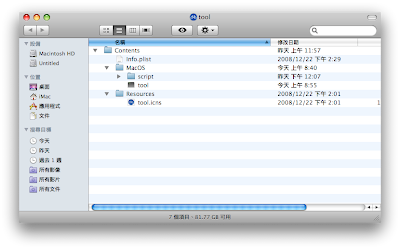
建立一個叫tool的資料夾。
之後,在tool資料夾裡,建立一個叫Contents的資料夾。
再建立MacOS和Resource二個資料夾。
將執行檔丟入MacOS資料夾。
將圖示丟入 Resource資料夾。再打開Developer->Applicationis->Utlities的Property List Sditor
- 2月 13 週五 200909:12
在mac中,建立應用程式的圖示(icns)
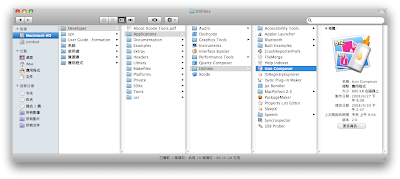
要先安裝xcode(在第二片安裝光碟中),之後在用Developer->Applicationis->Utlities的Icon Composer編輯圖檔,就可存成icns檔
- 2月 02 週一 200919:31
[轉貼]獨立遊戲開發者的獨孤九訣
以下文章轉貼至猴子靈藥。我個人,覺得翻譯的很用心,所以貼出來和大家分享。
原文出處:Nine Paths To Indie Game Greatness
本文的作者,是一位曾製作過 PC、Console 以及 Mobile 平台遊戲的專業開發者。自從他以《Quake》內附的編輯器,製作出第一個遊戲關卡的那一刻起,他就領略到了創造遊戲的那種無上樂趣,也因此下定決心開始學習如何製作遊戲。然而當他在遊戲業界中,經歷了六年的工作生涯後,反而開始質疑自己是否擁有繼續開發遊戲的渴望。就在他決心離開遊戲業界,去嘗試其他的事物之後,反倒從如新生嫩芽般的獨立遊戲社群中,再次重新找回自己對於創造遊戲的熱情。
原文出處:Nine Paths To Indie Game Greatness
本文的作者,是一位曾製作過 PC、Console 以及 Mobile 平台遊戲的專業開發者。自從他以《Quake》內附的編輯器,製作出第一個遊戲關卡的那一刻起,他就領略到了創造遊戲的那種無上樂趣,也因此下定決心開始學習如何製作遊戲。然而當他在遊戲業界中,經歷了六年的工作生涯後,反而開始質疑自己是否擁有繼續開發遊戲的渴望。就在他決心離開遊戲業界,去嘗試其他的事物之後,反倒從如新生嫩芽般的獨立遊戲社群中,再次重新找回自己對於創造遊戲的熱情。
- 7月 27 週日 200809:53
關於sun.audio出現Could not create AudioData Object的錯誤
這個問題是在audioStream.getData()中發生的,
102 public AudioData getData() throws IOException {
103 int length = getLength();
104
105 //limit the memory to 1M, so too large au file won't load
106 if (length < 1024*1024) {
107 byte [] buffer = new byte[length];
108 try {
102 public AudioData getData() throws IOException {
103 int length = getLength();
104
105 //limit the memory to 1M, so too large au file won't load
106 if (length < 1024*1024) {
107 byte [] buffer = new byte[length];
108 try {
