PIXNET Logo登入

阿勇的blog

跳到主文

歡迎光臨阿勇在痞客邦的小天地

部落格全站分類:不設分類

  • 相簿
  • 部落格
  • 留言
  • 名片
  • 4月 03 週五 200915:38
  • Qt Opengl Splash Screen


glwidget.h
#ifndef GLWIDGET_H
#define GLWIDGET_H
#include <QGLWidget>
class GLWidget : public QGLWidget
{
Q_OBJECT
public:
GLWidget(QWidget *parent = 0);
~GLWidget();
QSize minimumSizeHint() const;
QSize sizeHint() const;
public slots:
void setXRotation(int angle);
void setYRotation(int angle);
void setZRotation(int angle);
signals:
void xRotationChanged(int angle);
void yRotationChanged(int angle);
void zRotationChanged(int angle);
protected:
void initializeGL();
void paintGL();
void resizeGL(int width, int height);
void mousePressEvent(QMouseEvent *event);
void mouseMoveEvent(QMouseEvent *event);
private:
GLuint makeObject();
void quad(GLdouble x1, GLdouble y1, GLdouble x2, GLdouble y2,
GLdouble x3, GLdouble y3, GLdouble x4, GLdouble y4);
void extrude(GLdouble x1, GLdouble y1, GLdouble x2, GLdouble y2);
void normalizeAngle(int *angle);
GLuint object;
int xRot;
int yRot;
int zRot;
QPoint lastPos;
QColor trolltechGreen;
QColor trolltechPurple;
};
#endif

(繼續閱讀...)
文章標籤

阿勇 發表在 痞客邦 留言(0) 人氣(7)

  • 個人分類:Qt
▲top
  • 4月 03 週五 200911:31
  • Qt 啟動畫面(Splash Screen)

#include <QtGui/QApplication>
#include <QMainWindow>
#include <QPixmap>
#include <QBitmap>
#include <QSplashScreen>
int main(int argc, char *argv[])
{
QApplication a(argc, argv);
//啟動畫面
QSplashScreen *splash = new QSplashScreen;
//顯示圖片
QPixmap px(":/res/logo.png");
splash->setPixmap(px);
//遮罩圖
splash->setMask(px.mask());
splash->show();
QMainWindow w;
w.show();
//如果w顯示出來的話,才關閉啟動畫面
splash->finish(&w);
delete splash;
return a.exec();
}
(繼續閱讀...)
文章標籤

阿勇 發表在 痞客邦 留言(0) 人氣(18)

  • 個人分類:Qt
▲top
  • 4月 01 週三 200916:05
  • Qt Opengl QMainWindow

glwidget.h
#ifndef GLWIDGET_H
#define GLWIDGET_H
#include <QGLWidget>
class GLWidget : public QGLWidget
{
public:
GLWidget(QWidget *parent);
~GLWidget();
void initializeGL();
void paintGL();
void resizeGL(int w, int h);
};
#endif // GLWIDGET_H
(繼續閱讀...)
文章標籤

阿勇 發表在 痞客邦 留言(0) 人氣(67)

  • 個人分類:Qt
▲top
  • 4月 01 週三 200915:50
  • Qt Opengl

glwidget.h
#ifndef GLWIDGET_H
#define GLWIDGET_H
#include <QGLWidget>
class GLWidget : public QGLWidget
{
public:
GLWidget();
~GLWidget();
void initializeGL();
void paintGL();
void resizeGL(int w, int h);
};
#endif // GLWIDGET_H
(繼續閱讀...)
文章標籤

阿勇 發表在 痞客邦 留言(0) 人氣(4)

  • 個人分類:Qt
▲top
  • 4月 01 週三 200914:21
  • Qt menu for Mac


#include <QApplication>
#include <QMainWindow>
#include <QMenuBar>
#include <QAction>
int main(int argc, char *argv[]) {
QApplication app(argc, argv);
QMainWindow *mainWindow = new QMainWindow;
mainWindow->setWindowTitle("QMainWindow");
QMenu *fileMenu = new QMenu("File");
fileMenu->addAction("Quit", &app, SLOT(quit()), Qt::CTRL + Qt::Key_Q);
mainWindow->menuBar()->addMenu(fileMenu);
mainWindow->show();
return app.exec();
}
(繼續閱讀...)
文章標籤

阿勇 發表在 痞客邦 留言(0) 人氣(7)

  • 個人分類:Qt
▲top
  • 3月 13 週五 200909:38
  • 如何在xcode中設定圖示


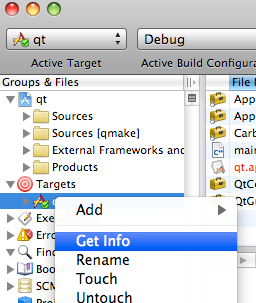
之前已經說過如何產生圖示,像在要說的是在xcode中如何設定。
在專案的Targets中,打開info。在info的Properties中,設定Icon檔的名字。在專案的Targets中,用add->existing files將icon檔加入resouse。
現在,只要編譯後,app檔案就會自動產生圖示了。
(繼續閱讀...)
文章標籤

阿勇 發表在 痞客邦 留言(0) 人氣(71)

  • 個人分類:xcode
▲top
  • 3月 04 週三 200915:44
  • picasa api

這是一個簡單的picasa工具,google有簡單的使用教學。
這個程式,主要將就的相本刪除,以新的相本替換。
import java.io.File;
import java.io.FileReader;
import java.io.BufferedReader;
import java.io.FileWriter;
import java.io.BufferedWriter;
import java.net.URL;
import com.google.gdata.client.photos.*;
import com.google.gdata.data.*;
import com.google.gdata.data.media.*;
import com.google.gdata.data.photos.*;
/**
*
* @author iMac
*/
public class picasa {
public static void main(String[] args) {
try {
//連結服務端
PicasawebService myService = new PicasawebService("專案名稱(隨便你)");
myService.setUserCredentials("帳號", "密碼");
//相本代碼
String id = "";
//相本代碼存於picasa.id
File file = new File("picasa.id");
if (file.exists()) {
//讀出相本代碼
BufferedReader buffer = new BufferedReader(new FileReader(file));
id = buffer.readLine();
//刪除picasaweb的相本
URL albumPostUrl = new URL("http://picasaweb.google.com/data/entry/api/user/你的大名/albumid/" + id);
AlbumEntry insertedEntry = myService.getEntry(albumPostUrl, AlbumEntry.class);
insertedEntry.delete();
buffer.close();
}
//移至個人資料夾
URL feedUrl = new URL("http://picasaweb.google.com/data/feed/api/user/你的大名?kind=album");
//建立新相本
AlbumEntry myAlbum = new AlbumEntry();
//相本名稱
myAlbum.setTitle(new PlainTextConstruct("相本名稱"));
//相本描述
myAlbum.setDescription(new PlainTextConstruct("相本描述"));
//相本為公開性質
myAlbum.setAccess("public");
//登入伺服器,建立相本
AlbumEntry insertedEntry = myService.insert(feedUrl, myAlbum);
//截取新相本代碼
String s = insertedEntry.getId();
int index = s.lastIndexOf("/");
id = s.substring(index + 1);
//移至新相本
URL albumPostUrl = new URL("http://picasaweb.google.com/data/feed/api/user/你的大名/albumid/" + id);
//建立新照片
PhotoEntry myPhoto = new PhotoEntry();
//照片名稱
myPhoto.setTitle(new PlainTextConstruct("照片名稱"));
//照片描述
myPhoto.setDescription(new PlainTextConstruct("照片描述"));
myPhoto.setClient("myClientName");
//設定上傳檔案
MediaFileSource myMedia = new MediaFileSource(new File("2.JPG"), "image/jpeg");
myPhoto.setMediaSource(myMedia);
//登入伺服器,上傳
PhotoEntry returnedPhoto = myService.insert(albumPostUrl, myPhoto);
//儲存新相本代碼
BufferedWriter buffer = new BufferedWriter(new FileWriter(file));
buffer.write(id);
buffer.close();
} catch (Exception e) {
System.out.println(e);
}
}
}
(繼續閱讀...)
文章標籤

阿勇 發表在 痞客邦 留言(0) 人氣(14)

  • 個人分類:picasa
▲top
  • 2月 20 週五 200910:47
  • java副檔名過濾器

import java.io.File;
import java.io.FileFilter;
public class ExtensionFileFilter implements FileFilter {
private String[] extension;
public ExtensionFileFilter(String[] s) {
extension=s;
}
public boolean accept(File file) {
if (file.isDirectory()) {
return false;
}
String name = file.getName();
// find the last
int index = name.lastIndexOf(".");
if (index == -1) {
return false;
} else if (index == name.length() - 1) {
return false;
} else{
for(int i=0;i<extension.length;i++){
boolean b=extension[i].equals(
name.substring(index + 1).toLowerCase());
if(b){
return true;
}
}
return false;
}
}
}
(繼續閱讀...)
文章標籤

阿勇 發表在 痞客邦 留言(0) 人氣(75)

  • 個人分類:java
▲top
  • 2月 20 週五 200910:37
  • 關於java中初始化界面中jProgressBar設計

//設定初使化的JFrame
frame = new InitFrame();
Thread thread = new Thread(new Runnable() {
public void run() {
//在這裡做設定主畫面的設定
for(){
frame.progress.setValue(i);
}
}
});
thread.start();
(繼續閱讀...)
文章標籤

阿勇 發表在 痞客邦 留言(0) 人氣(5)

  • 個人分類:java
▲top
  • 2月 20 週五 200910:35
  • JFrame置中

//要放在pack,setVisible之後。
frame.setLocationRelativeTo(null);
(繼續閱讀...)
文章標籤

阿勇 發表在 痞客邦 留言(0) 人氣(18)

  • 個人分類:java
▲top
«1...9101113»

個人資訊

阿勇
暱稱:
阿勇
分類:
不設分類
好友:
累積中
地區:

熱門文章

  • (0)Cordova速記
  • (0)Cordova run simulation
  • (5)swift速記
  • (1)cordova發布到andriod
  • (4)迷香
  • (11)notification results in “unrecognized selector sent to instance…”
  • (0)分開設定xcode的configureration
  • (10)關於doesNotRecognizeSelector引起的exception crash
  • (1)在SQL中,當二個鍵同時相等時,唯一鍵成立。
  • (56)防止繼承的delegate跟原本的衝突(how to extend a protocol for a delegate in objective C)

文章分類

  • 替代役的日子 (5)
  • 黑色鈣片 (4)
  • java (3)
  • picasa (1)
  • lua (1)
  • mingw (1)
  • nsis (1)
  • squirrel (1)
  • freetype (1)
  • bitmap font (7)
  • windows (5)
  • c (1)
  • NetBeans (2)
  • uml (1)
  • html5 (1)
  • Wheel Light (4)
  • Qt (26)
  • opengl (6)
  • chrome (2)
  • hg (2)
  • mac (4)
  • apns (1)
  • python (4)
  • php (2)
  • SQL (4)
  • iOS (3)
  • xcode (4)
  • Objective-C (8)
  • phonegap (1)
  • swift (1)
  • cordova (2)
  • 未分類文章 (1)

最新文章

  • Cordova速記
  • Cordova run simulation
  • swift速記
  • cordova發布到andriod
  • 迷香
  • notification results in “unrecognized selector sent to instance…”
  • 分開設定xcode的configureration
  • 關於doesNotRecognizeSelector引起的exception crash
  • 在SQL中,當二個鍵同時相等時,唯一鍵成立。
  • 防止繼承的delegate跟原本的衝突(how to extend a protocol for a delegate in objective C)

動態訂閱

文章精選

文章搜尋

誰來我家

參觀人氣

  • 本日人氣:
  • 累積人氣: