- Mar 02 Sat 2013 20:32
-
3D text on Qt with OpenGL (part 2)

- Mar 02 Sat 2013 16:55
-
Qt 讀取非系統字型
使用QFontDatabase::addApplicationFont,可以直接讀取字型 檔(ttc, ttf)。
#include <QFontDatabase>
QString loadFontFromFile(QString path)
{
static QString font;
static bool loaded = false;
if(!loaded)
{
loaded = true;
int loadedFontID = QFontDatabase::addApplicationFont(path);
QStringList loadedFontFamilies = QFontDatabase::applicationFontFamilies(loadedFontID);
if(!loadedFontFamilies.empty())
font = loadedFontFamilies.at(0);
}
return font;
}
QString fontName = loadFontFromFile(":/font/font2.TTC");
QFont font(fontName);
#include <QFontDatabase>
QString loadFontFromFile(QString path)
{
static QString font;
static bool loaded = false;
if(!loaded)
{
loaded = true;
int loadedFontID = QFontDatabase::addApplicationFont(path);
QStringList loadedFontFamilies = QFontDatabase::applicationFontFamilies(loadedFontID);
if(!loadedFontFamilies.empty())
font = loadedFontFamilies.at(0);
}
return font;
}
QString fontName = loadFontFromFile(":/font/font2.TTC");
QFont font(fontName);
- Mar 01 Fri 2013 14:20
-
3D text on Qt with OpenGL
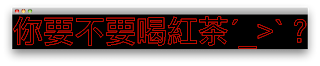
利用QPainterPath算出polygon之後,就可以畫出邊框
QPainterPath path;
path.addText(QPointF(0, 0), QFont("Arial", 100), QString::fromUtf8("你要不要喝紅茶ˊ_>ˋ?"));
GLuint id = glGenLists(1);
glNewList(id, GL_COMPILE);
foreach(QPolygonF polygon, path.toSubpathPolygons()){
glBegin(GL_LINE_LOOP);
foreach(QPointF point, polygon){
glVertex3f(point.rx(), -point.ry(), 0);
}
glEnd();
}
glEndList();
- Feb 23 Sat 2013 17:24
-
可在mac和windows上執行的安裝光碟
首先建一個iso檔
hdiutil makehybrid /source/folder/name/ -o outputfile.iso
打開檔案
hdiutil attach -readwrite outputfile.iso
將需要的檔案丟入光碟裡
hdiutil makehybrid /source/folder/name/ -o outputfile.iso
打開檔案
hdiutil attach -readwrite outputfile.iso
將需要的檔案丟入光碟裡
- Feb 20 Wed 2013 21:59
-
wheel light軟體 - mac版

- Feb 18 Mon 2013 18:29
-
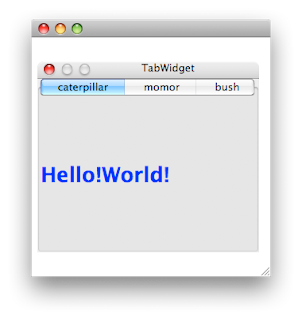
QGraphicsProxyWidge在mac下無法調整大小
- Feb 17 Sun 2013 17:48
-
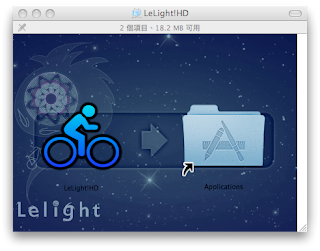
發佈Qt應用程式到mac
- Feb 06 Wed 2013 23:01
-
html5版的馬賽克
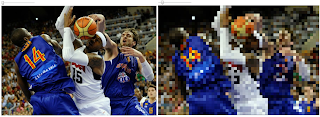
利用 input type="file"選取本地端圖檔用FileReader的readAsDataURL讀取圖檔將圖畫到canvas用range來當sliderbar,注意firefox不支援range接下來就是拿canvas來做影像處理了最後,再利用canvas.toDataURL("image/jpeg")轉回圖檔 index.html
<!DOCTYPE HTML PUBLIC "-//W3C//DTD HTML 4.01 Transitional//EN"
"http://www.w3.org/TR/html4/loose.dtd">
<html xmlns="http://www.w3.org/1999/xhtml">
<head>
<meta http-equiv="Content-Type" content="text/html; charset=utf-8" />
<title>Mosaic</title>
</head>
<body>
<input type="file" id="input" /><br/>
<canvas id="result" ></canvas>
<script src="jquery-1.9.0.min.js"></script>
<script src="mosaic.js"></script>
<script src="main.js"></script>
</body>
</html>
- Apr 25 Mon 2011 14:17
-
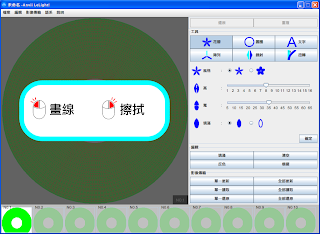
wheel light軟體
- Apr 21 Thu 2011 08:31
-
Qt creator + Qt lib + 中文化
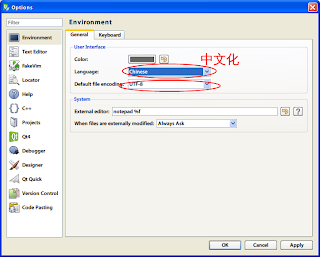
1.download Qt library 4.7.2 and MinGW
2.install Qt to C:\Qt\4.7.2
3.unzip mingw.zip to c:\Qt
4.download Qt creator
- Mar 28 Mon 2011 10:36
-
設定 NetBeans 原始程式檔以 UTF-8 編碼
開啟C:\Program Files\NetBeans 6.5.1\etc\netbeans.conf
在netbeans_default_options後面加入"-J-Dfile.encoding=UTF-8"
在netbeans_default_options後面加入"-J-Dfile.encoding=UTF-8"
